
The Dashboard
Guidelines for Accessing The Brewers of Europe Members Area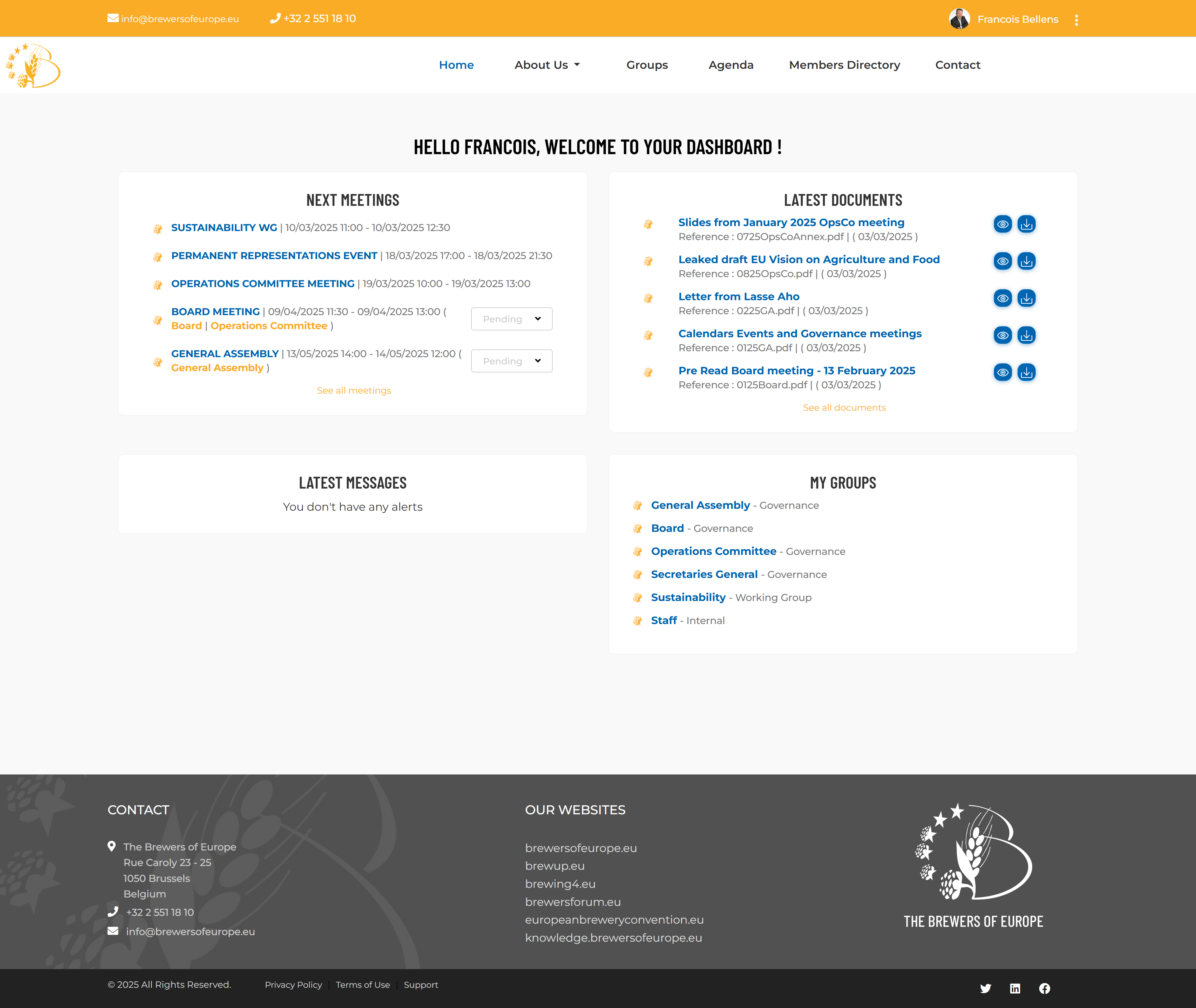
Upon logging in, you will be directed to a personalized dashboard designed to provide you with relevant and up-to-date content. The dashboard is organized into four distinct sections:
- Next meetings
- Latest documents
- Latest messages
- My Groups
Next Meetings
Stay informed about upcoming events and important dates relevant to your group membership. If your participation is required, a dropdown list will appear, allowing you to confirm or decline your attendance with a single click. For more details about an event, simply click on its name to access the dedicated information page.
Latest Documents
Quickly view and access newly published files and resources for the groups you belong to. The two icons on the right side of each document allow you to preview or download the file with a single click. To learn more about a specific document, simply click on its name to access the dedicated information page.
Latest Messages
Here, you will find a copy of all messages you should have received based on your group membership. This feature is particularly useful if you missed an email or if your email software mistakenly flagged a message from the platform as spam.
My groups
Easily navigate to the detailed pages of any group you belong to using this set of quick links, ensuring seamless access to relevant resources, and updates.